 Getting started
 Pipeline
 Forecasts
 Deals
Deals Deals (advanced)
 Proposals
 Exports
 Library
 Resources
 Integrations
 Settings
 Glossary
 FAQs
FAQs Releases
Webhook integrations
IN THIS ARTICLE
The Webhook integration works both ways. Send deal data out to any HTTPS endpoint when something changes in Estii, and receive deal updates back in from an external system.
What are webhooks
Webhooks let Estii exchange deal data with systems we don't integrate with directly. There are two directions, and you can use either or both:
- Send a request to your endpoint when a deal changes, using the Send Webhook action.
- Receive a request from your system to update a deal, using the Webhook Received trigger.
A common setup combines them. Estii sends a deal out when someone submits it for approval, your system reviews it, then sends the decision back to approve the deal or send it back for changes. See deal lifecycle and governance for the approval flow this supports.
Both directions are configured as automations in Settings > Workflow > Automations. Neither needs a connection step in the Integrations tab.
Sending webhooks
Use the Send Webhook action to POST deal data to your endpoint when an automation runs. This suits custom integrations, automation platforms like n8n, Make.com or Zapier, and any system that can receive an HTTPS request.
To create one:
- Go to Settings > Workflow > Automations
- Click New automation, or pick the Deal Updated then Send Webhook template
- Choose the event that triggers it, for example Deal Updated
- Add conditions if you only want it to fire in certain cases
- Add a Send Webhook action and configure the endpoint
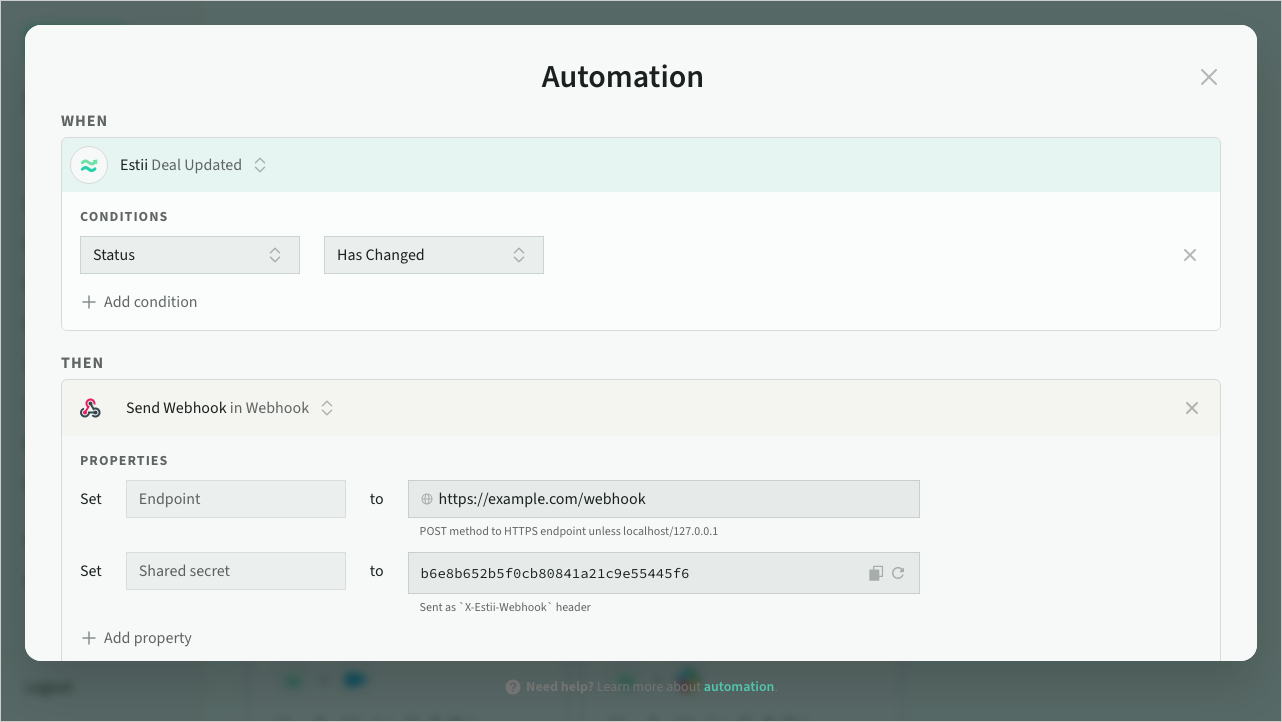 Webhook action configuration
 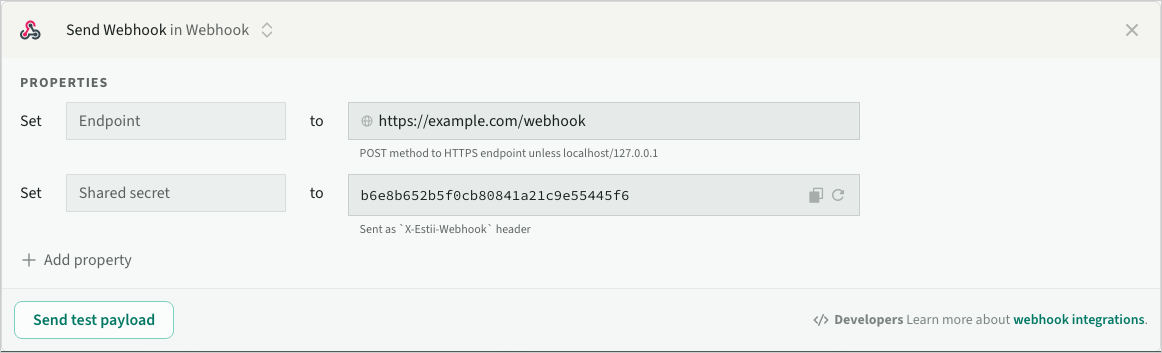 Send webhook event
Configure the action
The Endpoint URL is required. It must be an HTTPS URL, except for localhost/127.0.0.1, which are allowed for local development. For example https://hooks.example.com/estii-events.
The secret is generated for you and sent as the X-Estii-Webhook header so your endpoint can verify the request (see below).
The Message is optional. It supports dynamic values from the triggering event using the $field syntax, for example Deal $name status changed to $status.
Outbound payload
Every request sends a JSON body with the event, the current deal, and what changed:
{
  "event": "estii_deal_updated",
  "space_id": "abc123",
  "timestamp": "2026-01-27T14:30:00.000Z",
  "deal": {
    "id": "xyz789",
    "url": "https://app.estii.com/abc123/deals/xyz789",
    "name": "Acme Project",
    "status": "approved",
    "price": 55000,
    "cost": 40000,
    "currency": "usd",
    "margin": 0.27,
    "start": "2026-02-01T00:00:00.000Z",
    "end": "2026-03-15T00:00:00.000Z",
    "due": "2026-01-31T00:00:00.000Z",
    "owner": { "id": "member_456", "name": "Dom" }
  },
  "changes": { "status": "draft" },
  "message": "Deal Acme Project approved"
}
The top level has event (the trigger, e.g. estii_deal_updated), space_id, an ISO 8601 timestamp, the deal object, a changes object, and your optional message.
The deal object holds the current state of the deal:
| Field | Type | Description |
|---|---|---|
id | string | The deal id |
url | string | Direct link to the deal in Estii |
name | string | Deal name |
status | string | One of draft, pending, approved, progressed, won, lost, abandoned |
price | number | Deal price in space currency (2 dp) |
cost | number | Deal cost in space currency (2 dp) |
currency | string | Currency code, e.g. usd, gbp |
margin | number | Deal margin, 0 to 1 (4 dp) |
target_price | number | Target price (2 dp) |
probability | number | Win probability, 0 to 1 (4 dp) |
start | string | Start date (ISO 8601) |
end | string | End date (ISO 8601) |
due | string | Due date (ISO 8601) |
description | string | Deal description |
redraft_reason | string | Reason a deal was sent back from approval, present only when set |
closed_reason | string | Reason a deal was won, lost or abandoned, present only when set |
owner | object | Owner { id, name }, present only when the deal has an owner |
The changes object holds the previous value of each field that changed, so you can tell what changed and compare it against the current value in deal. When status changed from draft to approved, changes is { "status": "draft" }. If nothing tracked changed, changes is {}.
Verify requests
Every request includes an X-Estii-Webhook header containing your secret. Check it matches before processing the body:
app.post('/estii-webhook', (req, res) => {
  if (req.headers['x-estii-webhook'] !== process.env.ESTII_WEBHOOK_SECRET) {
    return res.status(401).json({ error: 'Invalid secret' })
  }
  const { event, deal, changes } = req.body
  if (changes.status) {
    console.log(`Status changed from ${changes.status} to ${deal.status}`)
  }
  res.status(200).json({ success: true })
})
Test before going live
Use the Send test button in the action to POST a sample payload to your endpoint. The test uses realistic dummy data so you can confirm your endpoint is wired up before activating the automation:
{
  "event": "deal_updated",
  "space_id": "test_space",
  "timestamp": "2026-01-27T12:00:00.000Z",
  "deal": {
    "id": "test_deal",
    "url": "https://app.estii.com/test_space/deals/test_deal",
    "name": "Sample Deal",
    "status": "approved",
    "price": 10000,
    "owner": { "id": "test_user", "name": "Test User" }
  },
  "changes": {},
  "message": "Test message from Estii"
}
Delivery and retries
Estii delivers on the initial attempt, then retries after 1 second and again after 5 seconds if needed. A delivery succeeds when your endpoint returns a 2xx status.
- 4xx responses are not retried, as they usually mean a configuration problem
- 5xx responses and network failures are retried
- A failed delivery doesn't block the automation from completing
Receiving webhooks
Use the Webhook Received trigger to let an external system update deals in Estii. Your system POSTs a deal update to an incoming endpoint, and an automation maps the payload onto the deal. Pre-approval is the main use: a deal waits in Pending approval while an external audit service signs it off.
To set one up, create an automation with the Webhook Received trigger, or use the Pre-approval gate template, then add an Update Deal action that maps the incoming fields onto the deal.
Find your endpoint and signing key
Open the automation. The incoming webhook panel under the trigger shows your endpoint URL, the signing key, and a sample payload, each with a copy button. The signing key is visible to admins only.
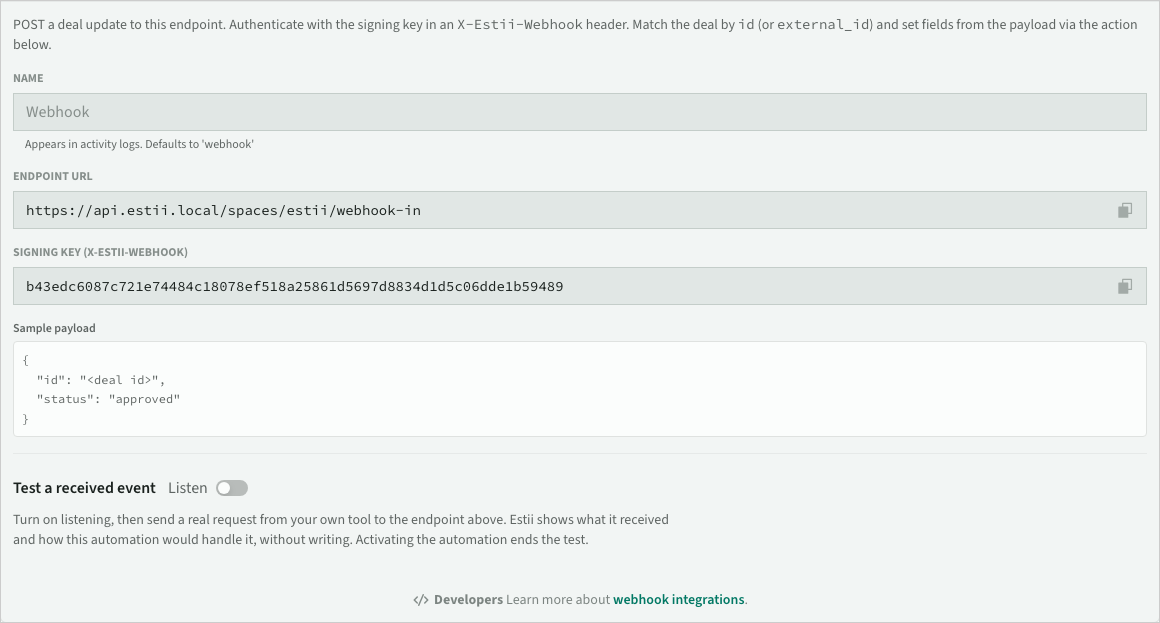 Incoming webhook connection details
Test a received event
Use the Test a received event button in the trigger panel to simulate an incoming event against the automation before activating it. Pick a deal, edit the sample payload, and Estii shows a receipt: the event it received, whether each condition matched, the deal the Update Deal action matched, and the changes it would apply (for example status: pending → approved). Nothing is written, so you can confirm the wiring and catch the two common setup mistakes (no Update Deal action mapped, or an id that matches no deal) without changing a deal or going live. This checks the automation logic; to confirm your external tool can reach and authenticate against the endpoint, send a real request and watch the deal update.
Authenticate requests
Send the signing key in an X-Estii-Webhook header. Estii rejects any request with a missing or incorrect key.
curl -X POST "https://<your-endpoint>/spaces/<space-id>/webhook-in" \
  -H "Content-Type: application/json" \
  -H "X-Estii-Webhook: <your-signing-key>" \
  -d '{ "id": "xyz789", "status": "approved" }'
Rate limits
The incoming endpoint is rate limited per space. It allows a short burst of requests and a steady rate after that, which is plenty for normal approval traffic. If you exceed it, Estii responds with HTTP 429 Too Many Requests and a Retry-After header giving the number of seconds to wait. A well-behaved client should pause for that long before retrying, rather than retrying immediately. Requests that are rate limited are not applied to any deal.
Send a payload
POST a flat JSON object. Every field is optional, so send only what you want to change. The decision is carried by status.
| Field | Type | Description |
|---|---|---|
id | string | Estii deal id to match |
external_id | string | Your system's id; matches a deal, or is saved onto the matched deal |
status | string | One of draft, pending, approved, progressed, won, lost, abandoned |
name | string | Deal name |
target_price | number | Target price |
target_margin | number | Target gross margin, 0 to 1 |
due | number | Due date, epoch milliseconds |
start | number | Start date, epoch milliseconds |
probability | number | Win probability, 0 to 1 |
redraft_reason | string | Reason shown when you send a deal back (status: draft) |
closed_reason | string | Reason shown when you close a deal (status: won/lost/abandoned) |
Map the fields you send onto the deal in the Update Deal action. Fields you don't send, or send as null, are left unchanged.
Setting status moves the deal through that stage as if you did it in Estii: it records the stage date (for example the approved or closed date), and sending a deal back to draft clears those later-stage dates.
How deals are matched
The Update Deal action finds the deal to update like this:
- It matches on
idfirst. Deals created in Estii have anidbut no external id, so this is the usual case. - If you don't send an
id, it matches onexternal_id. - If you send both an
idand anexternal_id, it matches onidand saves theexternal_idonto that deal. This lets your system record its own reference back onto the Estii deal after Estii notifies it of a new deal. - If no deal matches, nothing happens. The incoming webhook never creates a deal.
Example: pre-approval gate
When someone requests approval, the deal moves to Pending approval and stays read-only. Notify your audit system with a Send Webhook on that change (the outbound payload includes the deal id). Your system reviews the deal, then POSTs back to the incoming endpoint:
{ "id": "xyz789", "status": "approved" }to sign the deal off{ "id": "xyz789", "status": "draft" }to send it back for changes
The Pre-approval gate template wires this up for you: a Webhook Received trigger and an Update Deal action that maps the incoming id and status onto the deal. Pair it with the approval role setting to reserve manual approval for higher roles. See deal lifecycle and governance.
Connect to other platforms
n8n
- Create a workflow with a Webhook trigger node set to accept POST requests
- Copy the webhook URL from n8n
- In Estii, create a Send Webhook automation and paste the URL
- Copy the secret from Estii and verify the
X-Estii-Webhookheader in n8n
Make.com
- Create a scenario with a Webhooks module and a custom webhook
- Copy the webhook URL
- In Estii, create a Send Webhook automation and paste the URL
- Use the secret in Make.com to verify incoming requests
Custom endpoint
Any HTTPS endpoint that accepts POST requests with JSON can receive Estii webhooks. Make sure it accepts Content-Type: application/json, verifies the X-Estii-Webhook header against your secret, returns a 2xx status, and responds within 30 seconds.
Need help?
Don't hesitate to get in touch with our support team if you need a hand setting up webhook automations.