



By the time a practice lead asks "can we staff this?" the answer is usually already "no, and we have known for three weeks." The work that just closed is scheduled, the work in pipeline is invisible to delivery, and the deal that changed shape on Tuesday is buried in a sales rep's inbox. Capacity is not missing. Visibility is.
Capacity planning for a technology solution provider matches available delivery time, by role, against committed projects and probability-weighted pipeline, so you can staff next quarter without burning or benching people.
What capacity planning actually is for a technology solution provider
Capacity planning in a pure software product org is mostly about engineering throughput and roadmap sequencing. Capacity planning in a technology solution provider is a different job. The firm has:
- Multiple practices or pods, each with their own roles and rates
- A pipeline of deals at different stages, each with a different probability of closing
- A backlog of committed projects with different shapes (fixed price, T&M, retainer, milestone)
- Sometimes a managed services or run component that consumes people every week regardless of projects
So when the COO asks the head of delivery "do we have capacity for this?", the honest answer depends on five or six assumptions that almost nobody has written down. Will the discovery deal that is 40% to close this month actually start in June? Will the CRM rollout signed in January need three senior Dynamics consultants in July or two? Is the retained support work still running at 25 hours a week or did that creep back up to 40?
Capacity planning is the discipline of making those assumptions explicit, at the role level, on a weekly or monthly cadence, and using the result to drive hiring, bench decisions, and which deals sales should actually chase.
The three layers of demand
A useful way to think about capacity at a services firm is in three layers stacked on top of each other: committed, forecast, and exposed.
Committed demand is the work you have already signed. Kick-off date is known, scope is signed, and the delivery team is named or being named. This is the easiest layer to plan because it behaves like a product backlog. The risk here is mostly scope drift and team changes, not demand uncertainty.
Forecast demand is the probability-weighted pipeline. A deal at 60% probability, closing in May, with a start date in June and a scoped estimate of 400 hours of senior consultant time, contributes 240 weighted hours to June demand. Sum that across every open deal and you get a realistic picture of what the next quarter looks like. Most firms either ignore this layer or they count closed-likely deals at 100% and everything else at zero, which collapses the model.
Exposed demand is the capacity you need to hold back because something might change. A committed deal whose scope is under review. A retained engagement with a clause that lets the client scale up by 30%. A pipeline deal you have told the prospect will start July 1 but which could slip to August. Exposed capacity is not free capacity and it is not committed capacity. It is the insurance buffer that makes the other two layers survive reality.
If your capacity plan only reflects the first layer, you will keep finding out about demand at the exact moment you can least respond to it.
Why spreadsheet capacity planning keeps breaking
Most firms I talk to have a capacity spreadsheet. Often several. Usually they are maintained by the head of delivery or a resource manager, updated weekly in theory and fortnightly in practice, and the rows are people and the columns are weeks.
That shape is the first problem. Planning at the named-person level looks precise and feels satisfying, but it creates three failure modes.
First, a plan keyed to named people turns into a scheduling artefact. It answers "what is Priya doing next week" but not "do we have enough senior Dynamics capacity in July". When sales ask the second question, the resource manager has to aggregate the sheet in their head.
Second, a named-person plan falls over every time someone resigns, goes on leave, or gets reallocated. You spend an hour updating cells and three hours telling the same story to five different practice leads.
Third, a named-person plan tempts you into treating pipeline as either 100% or 0%. You cannot comfortably write "50% of Priya for July" against a deal that has not closed. So the pipeline disappears from the view and the view loses the most important layer of demand.
The second problem with spreadsheet capacity planning is that assumptions live nowhere. A cell that reads 240 for June is the output of maybe seven human judgements: probability, start date, ramp, role mix, part-time vs full-time, productive hours, leave. Change any one of those and the number should change, but usually it does not, because nobody remembers where the 240 came from.
The third problem is that the capacity plan is disconnected from the estimates sellers are building. Sales produces a quote in one tool (or one spreadsheet), delivery builds a resource plan in another, and neither updates the other. When the quote changes shape, the capacity plan is wrong before anyone notices.
Plan at the role level, not the name level
The simplest upgrade most firms can make is to plan at the role level first, and resolve to named people only where it matters.
Roles are stable. "Senior Dynamics consultant" exists next year even if half the senior Dynamics consultants leave. Named people are volatile. If your primary view is "we need 6.5 senior Dynamics consultants in July and we have 5," you have a hiring and utilisation signal that survives staff changes and scales across practices.
Resolve to named people when one of three things is true:
- You are within 4 to 6 weeks of the start date and need to commit real humans
- The client has specified an individual in the SOW
- The skill is rare enough that the role-level number hides a real constraint (one principal architect is not interchangeable with another)
Below that threshold, treat roles as the unit of planning. This also makes the plan actually usable by sales. A salesperson does not care that Priya is 70% booked in July. They care that the senior Dynamics role is 130% subscribed in July, because that tells them whether to push hard on a deal that needs those skills.
Weight demand by probability and stage
If you only plan against signed work, you are always three months late on hiring and three months late on tough conversations with sales. Weighting demand by deal probability is the bridge between pipeline and delivery.
A simple starting point: for every open deal with a scoped estimate, contribute probability * hours * role mix to the relevant month. Use the stage probabilities your CRM already publishes if they are vaguely sensible, or replace them with a calibration table the delivery team actually trusts.
A worked example. Your pipeline in April has four deals that might consume senior Dynamics capacity in July:
- Deal A, 90% probability, 400 hours, starts June. Contributes 360 hours to June.
- Deal B, 60% probability, 300 hours, starts July. Contributes 180 hours to July.
- Deal C, 30% probability, 600 hours, starts July. Contributes 180 hours to July.
- Deal D, 15% probability, 800 hours, starts August. Contributes 120 hours to August.
Add those to your committed demand and compare against capacity per role. If the July number is 130% of available senior Dynamics hours, you have a decision to make now, not in June. Either one of B or C needs to slip, or a contractor needs to be lined up, or you hire, or you stop chasing deals in that slot.
The point is not to be forecast-accurate to the hour. The point is to surface the capacity decision while there is still time to make it.
Name your assumptions, every deal, every week
A weighted pipeline view is only as honest as the assumptions underneath it. Every deal on a capacity plan carries at least these four:
- Probability to close
- Start date
- Duration and ramp profile
- Role mix by week or month
If any of these live only in a sales rep's head, the capacity plan will be wrong in ways you cannot see until too late. The fix is to make assumptions named, attached to the deal, and reviewable.
Do this at the source, which is the estimate itself. An estimate that just says "400 hours" is less useful than one that says "120 hours discovery in May at 0.6 probability, 200 hours build across June and July at 0.4 probability, 80 hours hypercare in August at 0.3." The second one answers capacity questions. The first one just summarises a quote.
For more on making assumption governance explicit in estimates, see the guide on how to stop repeating the same estimation mistakes and the framework in how to price a scope of work.
The weekly capacity ritual
Once you have a role-level, weighted, assumption-named plan, the next question is how often to look at it and what to decide. Most firms I have seen get this wrong in one of two directions: monthly is too slow, daily is too noisy.
A weekly rhythm, with a shape, works better than either. Here is a version that holds up across firms from 50 to 300 people:
- Monday morning, the resource manager pulls the plan and flags any role-month that is above 100% subscribed or below 60%.
- Tuesday, the practice leads review the flags against current delivery reality. Scope changes, rebookings, leave.
- Wednesday, the head of sales and head of delivery do a 30 minute deal review against the updated capacity view. Which pipeline deals now look stressful in the relevant month. Which look easy.
- Thursday, hiring and contractor conversations happen if the plan shows a persistent gap.
- Friday, the plan is snapshotted, so next week you can see what moved.
This rhythm works because it respects the fact that the plan is a forecast, not a schedule. You are not trying to assign a human to a task. You are trying to answer "is the shape of the next 8 to 12 weeks survivable, and if not, which lever do we pull?"
Metrics that matter, and metrics that lie
Utilisation is the most misused metric in technology services. Tracked monthly, averaged across the firm, and reported in isolation, it tells you almost nothing about capacity health.
A firm with 75% blended utilisation can still be understaffed on the role it sells most, overstaffed on the role it sells least, and burning out the five people who happen to be on the three biggest deals. The blended number hides all three.
Better metrics for a capacity plan:
- Role-level subscription by week, for the next 12 weeks, at the committed and committed-plus-weighted view
- Bench hours by role, not by person
- Gap to target utilisation per practice, not per firm
- Rolling variance between planned and actual hours per role, month over month
- Share of demand coming from weighted pipeline vs committed backlog
The last one is quietly the most important. If 90% of your demand signal is committed and 10% is pipeline, you are behaving like a backlog-driven firm and you will be surprised every time pipeline converts. If 50% is pipeline, you are reading the future correctly but you need your probability weights to be calibrated.
Service Performance Insight's annual PS Maturity benchmark has tracked utilisation and bench metrics across professional services firms for years, and the headline finding rarely changes: firms with a working resource management function outperform firms without one on both margin and growth. The ritual is the differentiator, not the spreadsheet template.
What breaks at 75, 150, and 300 people
Capacity planning fails in different ways at different sizes. The shape of the failure is predictable enough to plan for.
At around 75 people, capacity planning is still manageable in a spreadsheet if one or two people own it end to end. What breaks first is the link between sales and delivery. The sales team stops believing the capacity plan because it is always out of date, and the delivery team stops updating it because nobody reads it. At this point the answer is usually not a bigger spreadsheet. It is a weekly ritual and a shared source of deal assumptions.
At around 150 people, multi-practice coordination starts to break. Each practice runs its own sheet, the formats drift, and aggregating across practices becomes a Friday afternoon job for a senior person. The weighted pipeline layer disappears entirely because nobody has time to maintain it. At this size, the capacity plan needs to be keyed off estimates, not off a separate resource planning artefact, so the source of truth collapses back to one.
At around 300 people, the failure is about rate of change. Deals are changing shape faster than the plan can absorb, practice structures are evolving, and the finance team starts building their own shadow capacity view because the delivery one no longer ties to forecast revenue. The fix here is structural: one commercial model from estimate through capacity through forecast, owned by the people closest to the deal, visible to everyone else.
For more on what breaks commercially as a firm scales, the guide on stop guessing margin at the point of sale covers the margin side of the same problem.
Where Estii fits
The three layers in this guide are not a rhetorical device. They are the shape of the Forecasts page in Estii, named almost identically: Confirmed, Forecast, Exposure. The plan reads from the same commercial model sales is already building, so the reconciliation job in the previous sections mostly disappears.
Three-layer portfolio, read from the same model
The Forecasts portfolio view shows capacity over time at all three layers at once. Confirmed is the committed backlog. Forecast weights every open deal by its stage probability. Exposure is the if-everything-closes ceiling. Move a deal from 30% to 60% on the pipeline and the Forecast layer updates. Change scope on a signed deal and the Confirmed layer updates. No separate spreadsheet to reconcile.
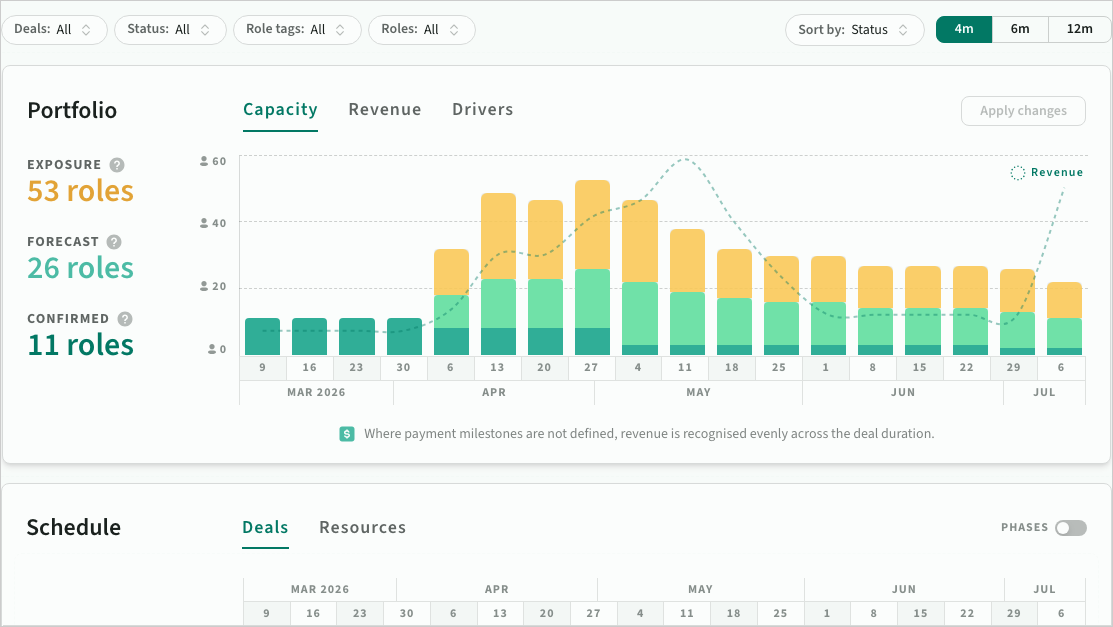 Confirmed, Forecast and Exposure capacity layers in Estii Forecasts
Drivers view for the role-month that is stressful
The Drivers view highlights which deals are creating the peaks and gaps in a given role-month. Hover a deal to light up the related schedule rows and resources across connected views. This is the answer to "we need 6.5 senior Dynamics consultants in July and we have 5" — one click shows which four deals are stacking on that role in that month, and the probability each is carrying.
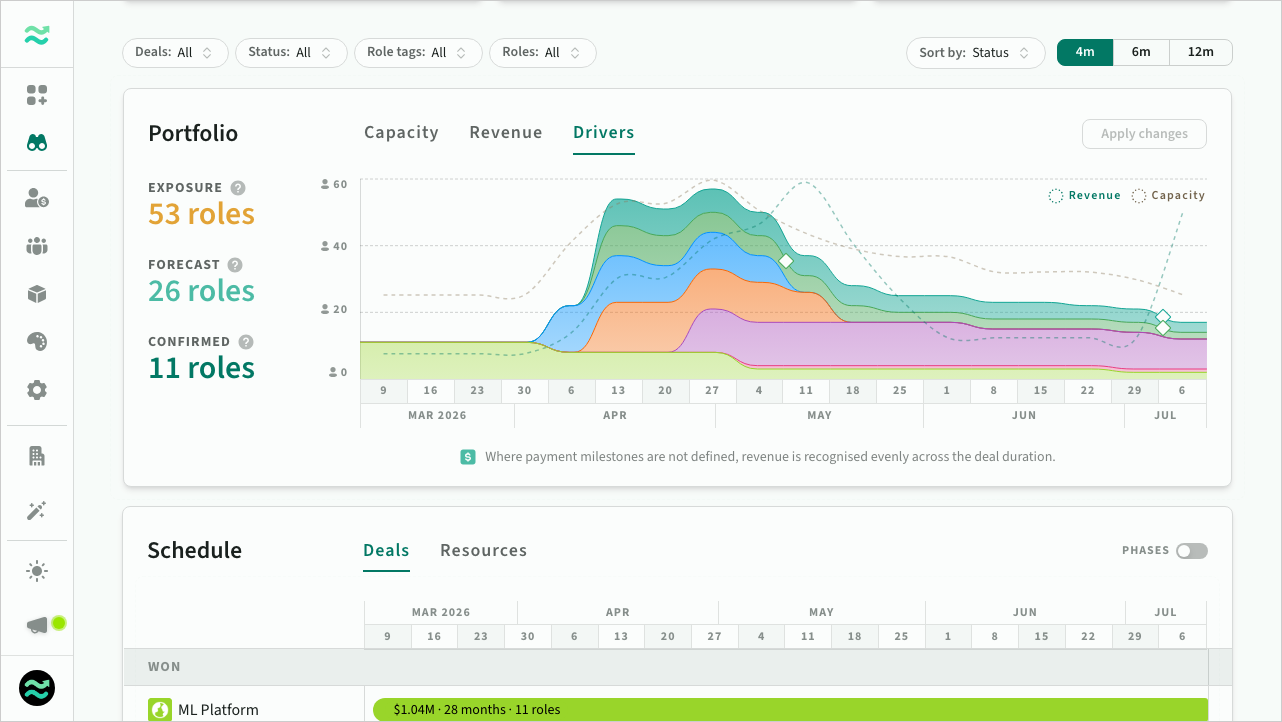 Deal drivers highlighting peaks and gaps per role
Rescheduling, before you commit
Pull a deal along the timeline in Drivers or the deal schedule, preview the revenue and capacity impact, then apply in one step. Locked deals snapshot for traceability, draft deals update immediately, stale edits are flagged before they overwrite. This is the "which lever do we pull" question from the weekly ritual, expressed as a drag, not a meeting.
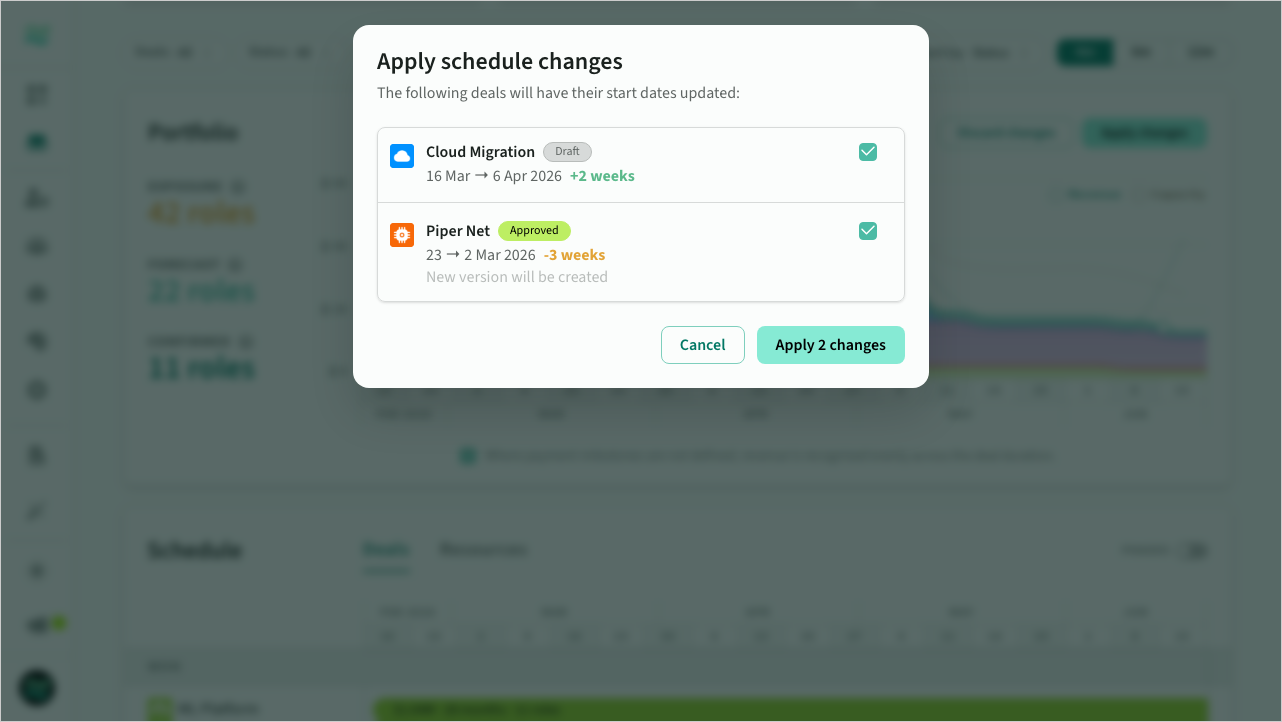 Apply rescheduled deal changes with traceability
Revenue recognition off real milestones
When payment milestones are defined on a deal, Forecasts recognises revenue off them directly. When they are missing, it applies sensible defaults. The finance shadow-sheet problem at 300 people collapses because the finance view and the delivery view are reading the same deal data.
Deal versions, so the snapshot is not manual
The weekly ritual ends with a plan snapshot. Estii does this automatically via deal versions. Approval freezes a read-only version, redraft creates the next, space sync captures midweek movement. Every version has a unique URL for preview or comparison, so "what moved since last Friday" is a diff, not a vibe.
What this looks like in practice
Monday morning the resource manager opens Forecasts filtered to the next 12 weeks. Two role-months are red. Drivers surfaces six deals stacking on senior Dynamics in July, three of them at 30-60% probability. Wednesday's sales and delivery review drags two of those deals into August in the reschedule workflow, previews the revenue shift, and applies. Friday's approved deals have already snapshotted themselves. The week's capacity work was 45 minutes across three people. Try Estii for free.
If you want to see where it fits next to the rest of the commercial stack, pick the right pricing model covers the pricing side of the same data model, and sales to delivery handover covers the handoff that usually destroys the capacity plan.
Wrapping up
Capacity planning for a technology solution provider is not a scheduling exercise. It is a weekly conversation about demand assumptions, role subscription, and the levers the firm has to pull when the next three months look stressful. Spreadsheets can carry that conversation up to a point, and then they cannot.
The fix is not more spreadsheet. It is a role-level view, a weighted pipeline layer, named assumptions per deal, a weekly rhythm, and a source of truth that is the same commercial model sales is already building in. Get those in place and capacity planning stops being the job nobody wants and starts being the most useful 45 minutes in your delivery week.