 Getting started
 Pipeline
 Forecasts
 Deals
Deals Deals (advanced)
 Proposals
 Exports
 Library
 Resources
 Integrations
 Settings
 Glossary
 FAQs
FAQs Releases
Library items
IN THIS ARTICLE
The library is a catalog of reusable, estimated library items. Promote proven work from real deals, let evidence from every approval accumulate safely, and pull estimated scope into new deals in seconds.
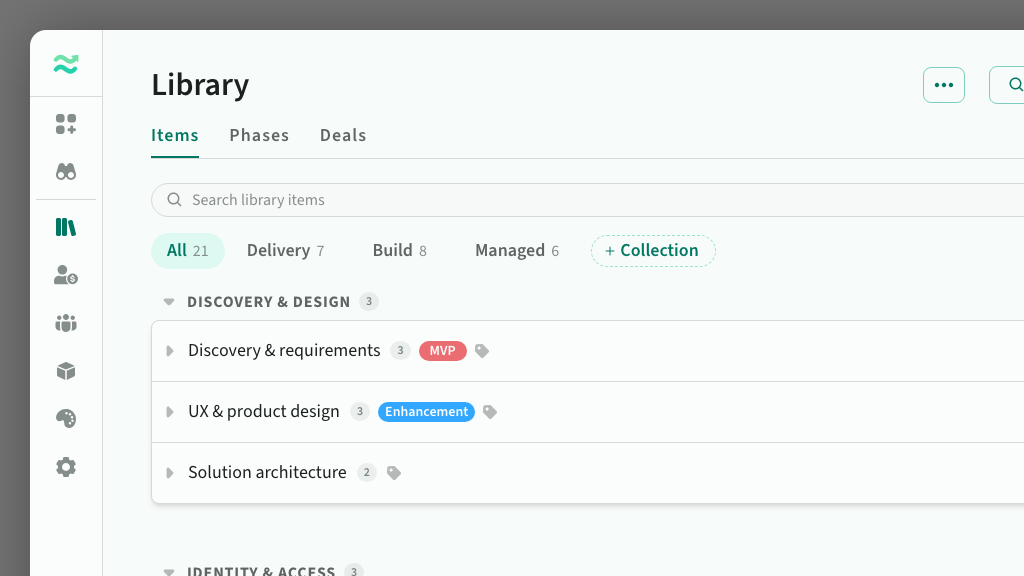
Library items live on the Library page under the Items tab, alongside your phase templates and deal templates. Each one is a component your team delivers repeatedly, like a payment integration or a discovery sprint, with tasks and estimate ranges built from evidence across your approved deals.
Managers and above edit the library; editors browse it and add its content to deals. See Members for access levels.
Add library items
- Promote from a deal. The menu on a section, feature, or task offers Promote to library, on draft and locked deals alike. The dialog shows what you are saving, flags near-duplicates, and lets you create a new item or merge into an existing one.
- Author in place. The catalog edits like a deal estimate: add an item to a group, then type its tasks, ranges, and tags inline.
- Harvest from past deals. Add from deal on the Items tab, or Save to library in deal search, captures features from any deal through the same dialog.
- Review suggestions. Estii suggests new items from work that recurs across your approved deals. Review them from Suggestions on the Items tab.
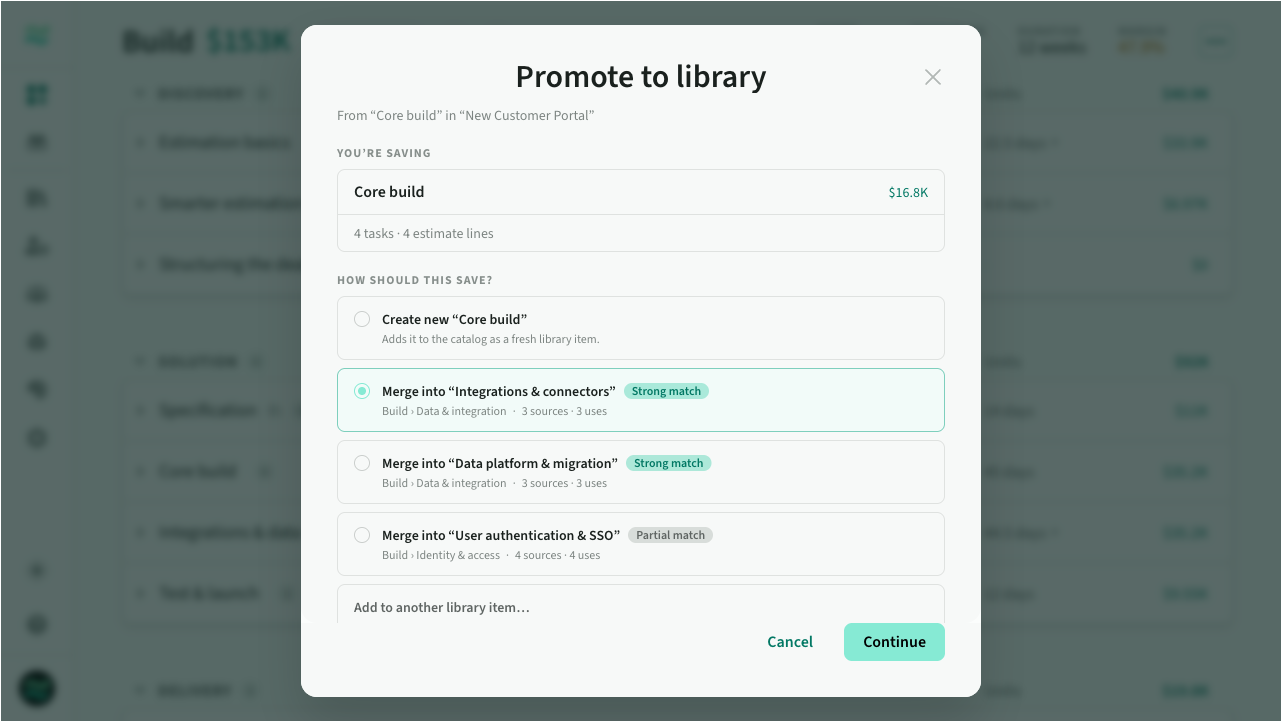 Promote to library
If a promoted estimate uses a resource the library doesn't have, the dialog asks you to place it: add it as a new library resource, match an existing one, or leave its lines out.
Merging into an existing library item
A merge shows a reconcile: each task and changed line carries a checkbox, with the current value beside the incoming one and an indicative price delta per task. Two optional extras record the deal's feature name as an alias (on by default) and adopt the capture's search text when the item has none.
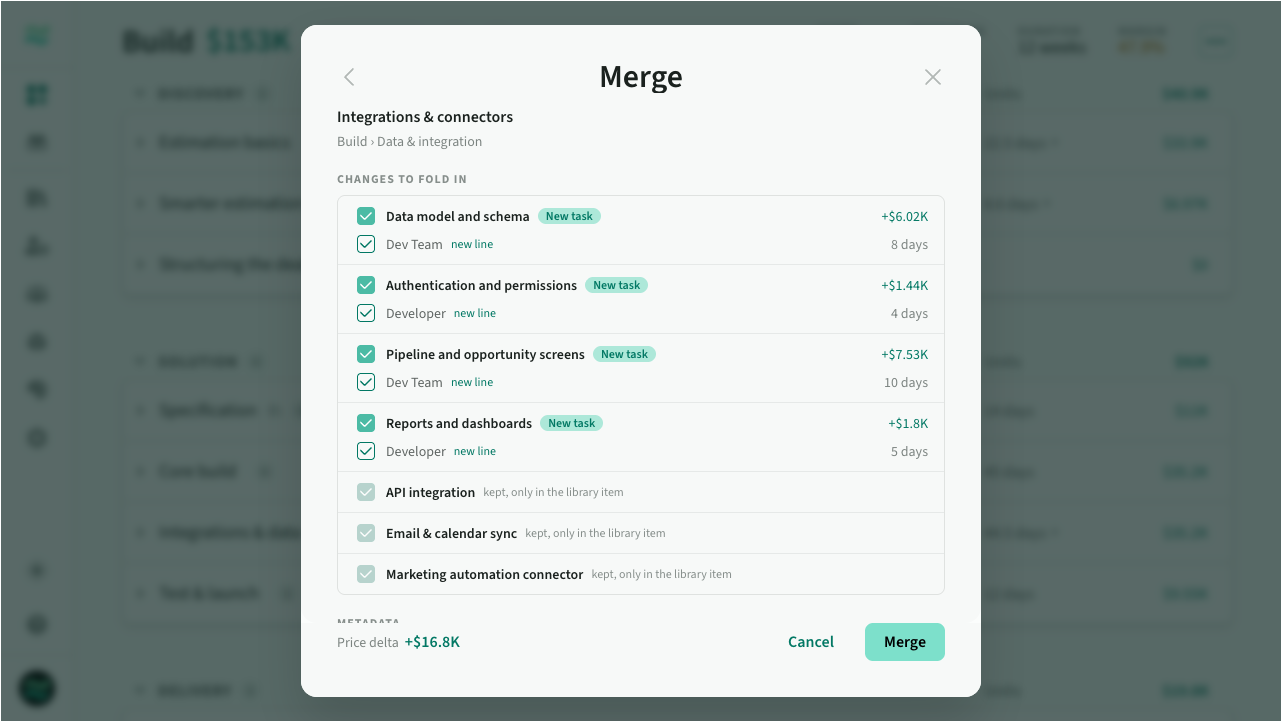 Merge review
Where a task description differs, keep the current text, use the captured text, or let Estii combine and improve the two. The combined text is shown for review and applies only on confirm.
Estimates that learn without drifting
Approving a deal adds its estimates as evidence to matching library items, but never changes a displayed range on its own. Approval also refreshes how items are found and read, and proposes the rest for review: the item's row shows a Review updates badge, and a toolbar filter collects everything waiting.
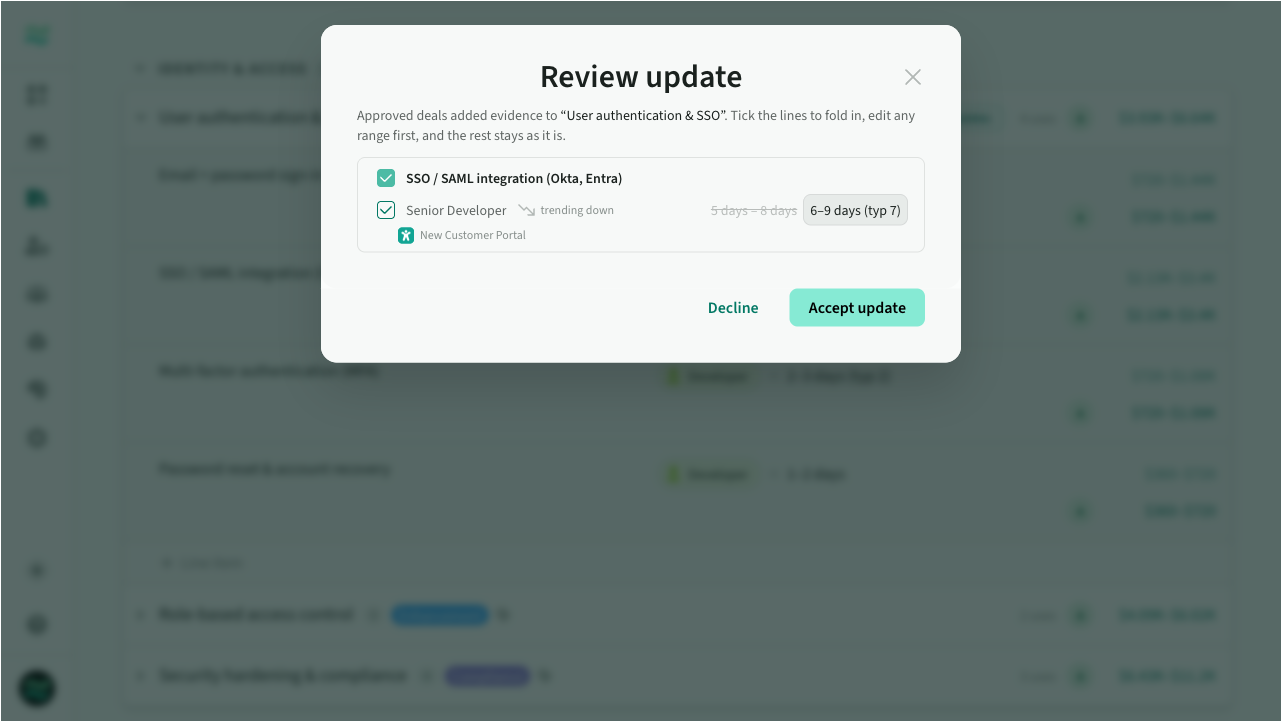 Review update
The review has two parts:
- Finding and placement. A section or phase name to use as a placement keyword, another name the deal used for the same work, a renamed task to reconnect to its estimates, and a task description distilled from deals that agree.
- Ranges. Each proposed range beside the current one, which deals contributed it, how many source deals carried the line, and whether recent deals trend up or down.
Tick what you agree with and confirm; the rest waits for a later review. Accepting a new name also applies that deal's estimates as evidence. Edit a range to lock it as manual, or decline to stop Estii proposing the same thing again. A hand-edited line is never overwritten by evidence.
New items from recurring work
As your team approves deals, Estii looks for work that appears repeatedly but isn't yet represented in your library. When it finds something that could be useful to reuse, it suggests a new library item for you to review.
Suggestions wait behind the Suggestions control on the Items tab, which appears only when there is something to review. They never appear in the catalog until you approve them.
Related work is grouped together. Each suggestion shows the proposed tasks, the range of estimates across the deals it came from, and where it will be filed. Expand a suggestion to see the source deals.
For each suggestion you can:
- Approve it, choosing its name, tasks, collection and group
- Merge it into an item you already have
- Discard it
Discarded suggestions won't immediately reappear. Estii will only suggest the work again if there is enough new evidence that it may be worth reconsidering.
Estii surfaces suggestions gradually, so you're given a manageable set to review rather than a backlog of everything it finds at once.
Organise the catalog
Items sit in groups, and groups sit in collections, shown as filter tabs for teams with different sets per deal type. Search, filters, and sort work across the catalog. Each row shows its tags, usage, relevance grade, and price range, and each task carries its own grade. Hover a grade for the reason; click it for the evidence task by task, including source deals.
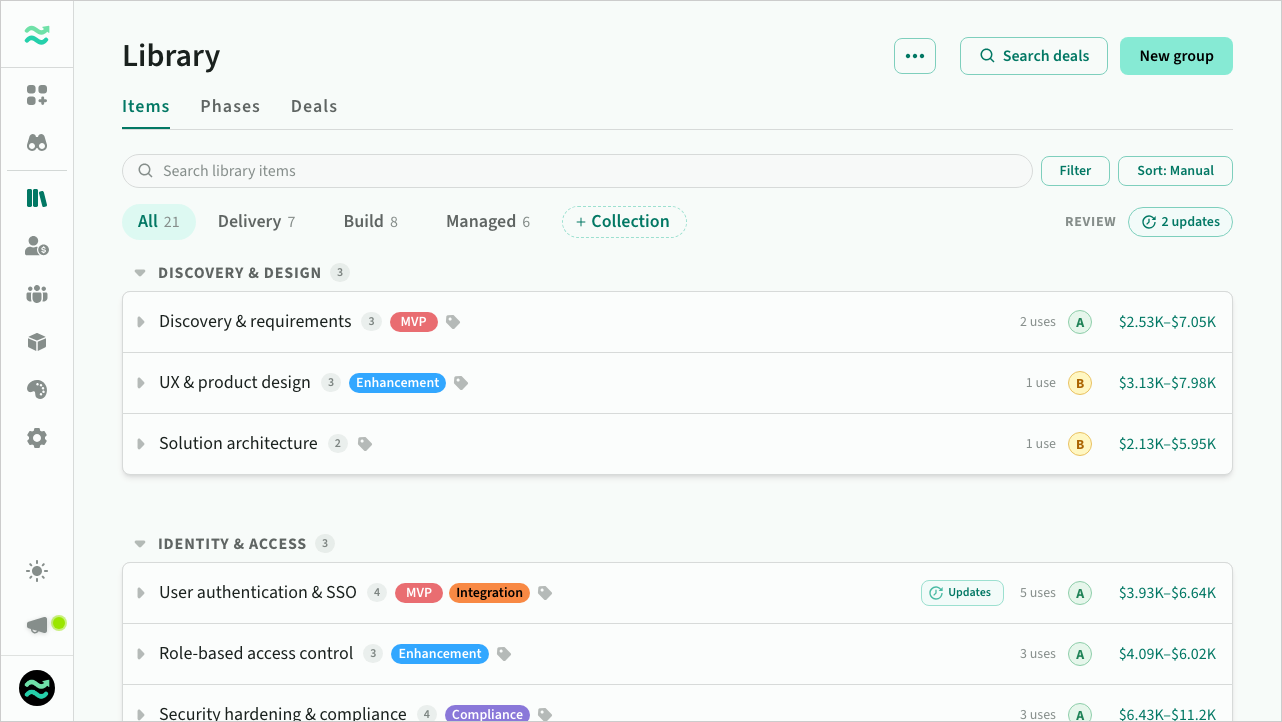 The catalog
Estimate ranges are typed naturally: 4d for a fixed four days, 3-5 days for a range, shown as 3–5 days (typ 4).
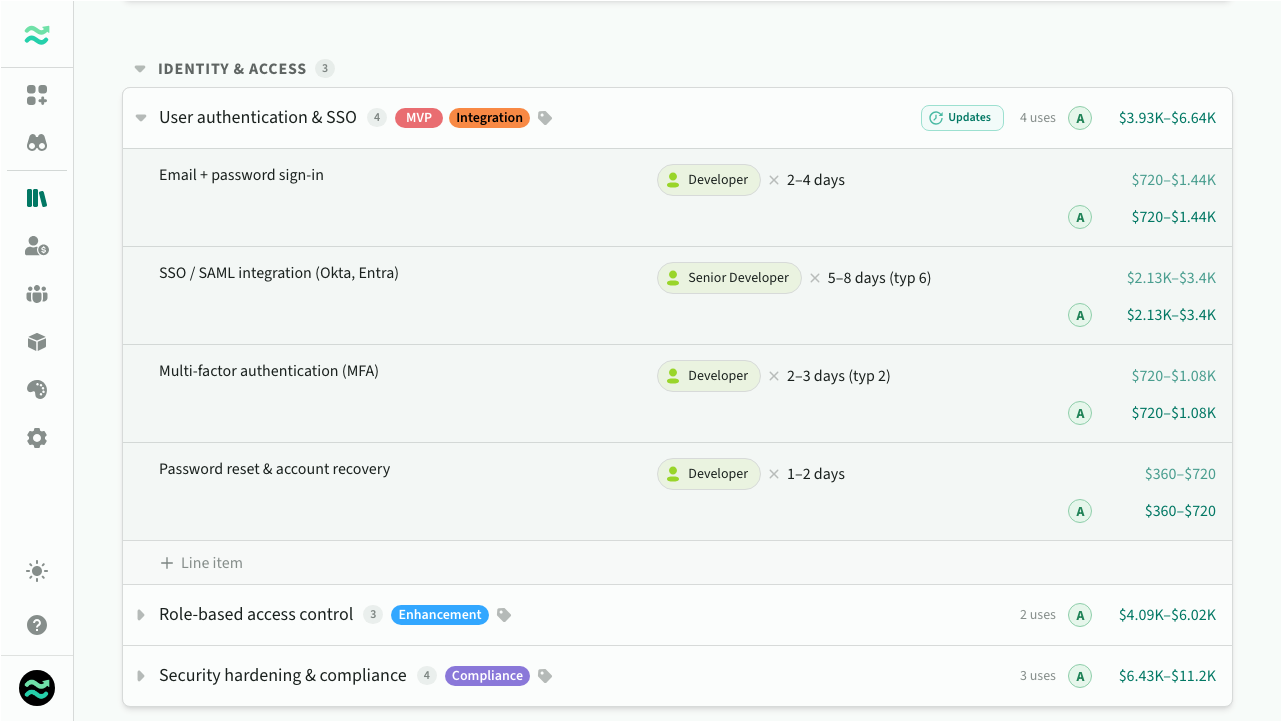 An expanded library item
An item's Intelligence rules control how Estii finds and places it:
- Search terms are the vocabulary it matches on, including words Estii contributes from approved deals, shown so you can see why it matched.
- Placement keywords are structural hints like "Discovery" or "Integrations": they pick the matching section when the item is added to a deal.
- Also known as lists other names the work goes by, whether you, a merge, or an approval added them; the item matches on any. Up to eight per item, and you remove one here when it is full.
- Instructions are short guidance the AI matching reads, like "prefer for enterprise deals" or "do not use for fixed-price work".
Beside the rules, a read-only panel lists the deals each task's evidence came from and the deals the item has been used in, naming a variant with its opportunity. Items you no longer want are archived, not deleted, and can be restored.
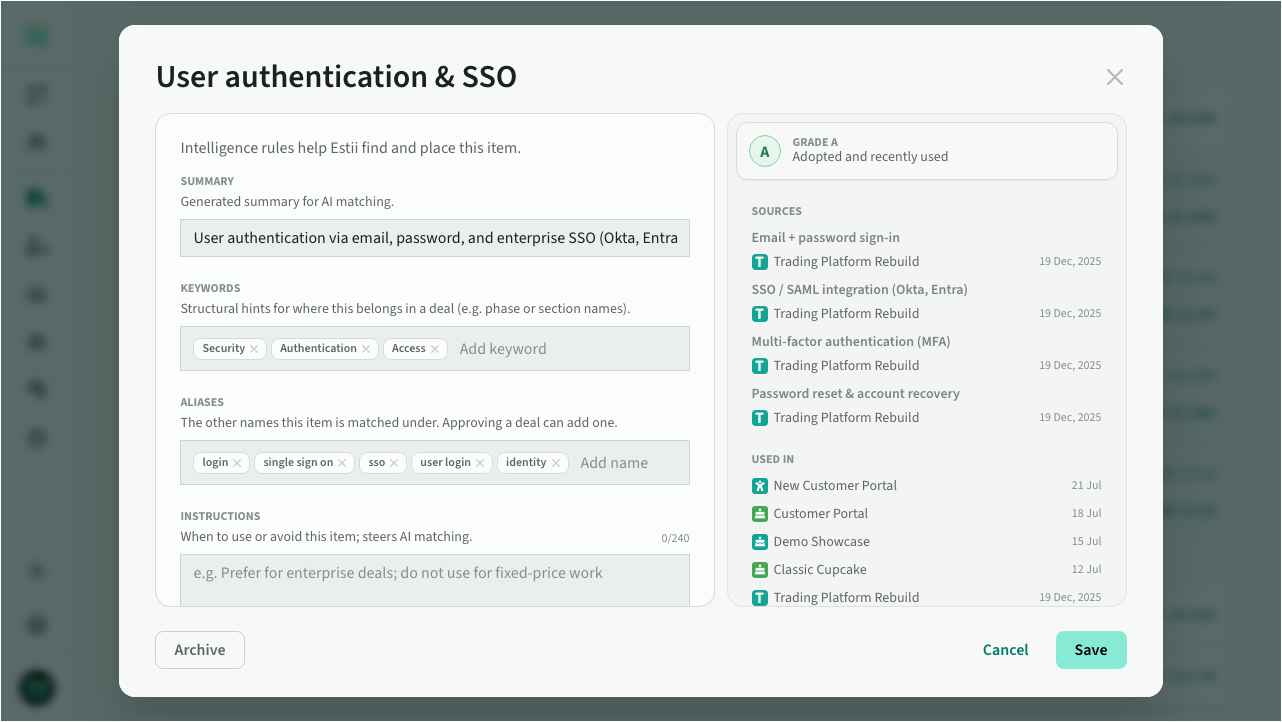 Intelligence rules
Add library items to a deal
From a section's menu, the + Add feature menu, or the phase header, choose Add from library. The search window has two tabs: Search library, and Search Deals to reuse work from past deals and templates instead.
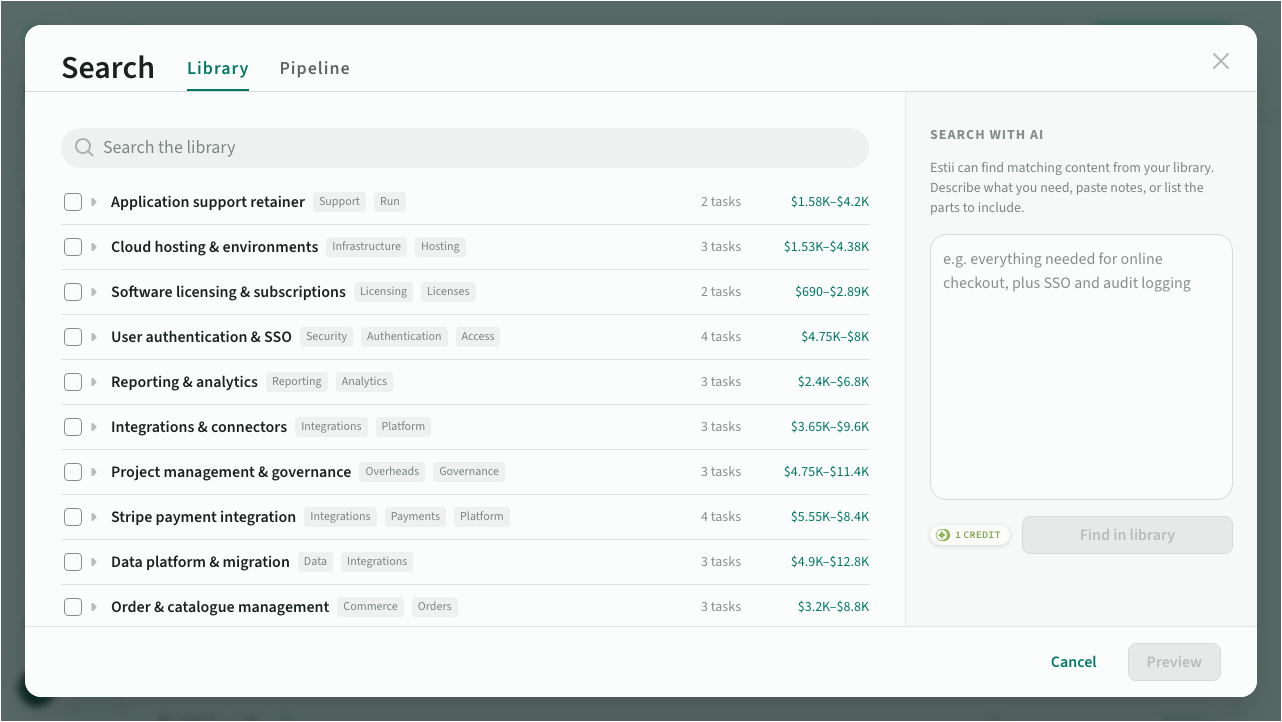 The search window
On Search library, keywords return items grouped by match strength with the reason they matched. Find in library takes a plain-language description of everything you need, groups the matches by the part of your request they answer, and lands each group in a matching section. AI search costs one credit per run.
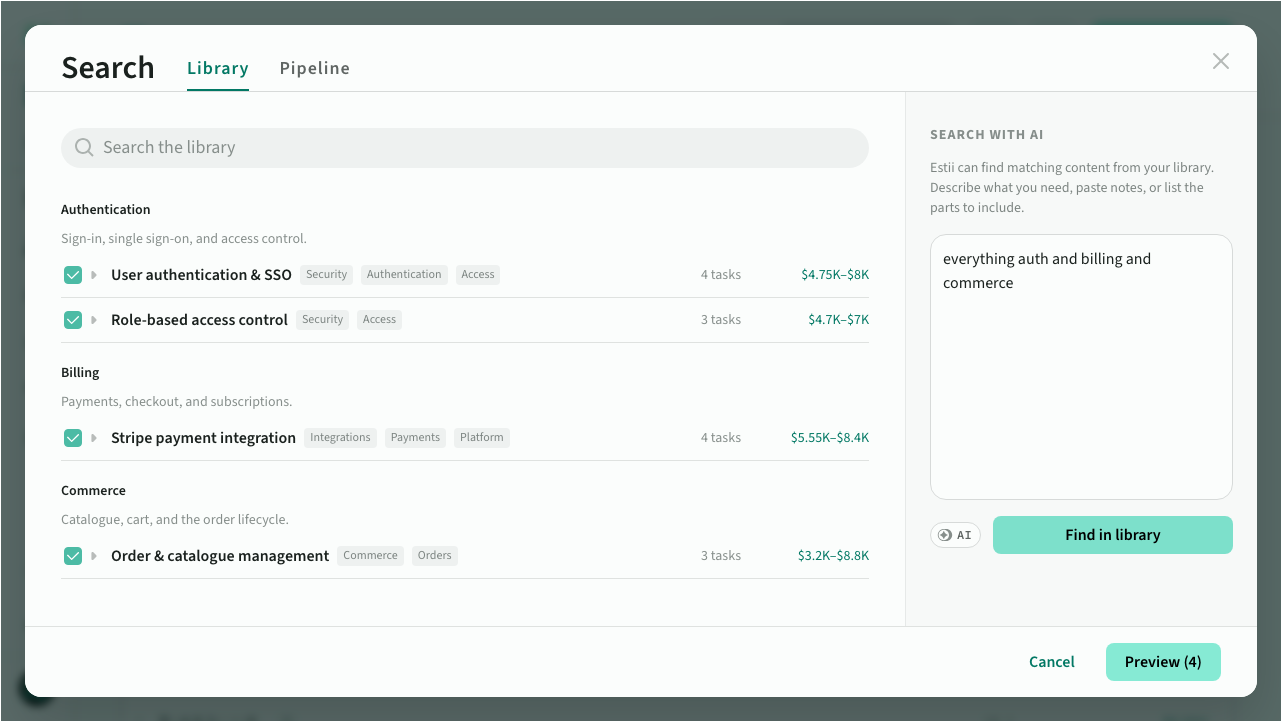 A described requirement matched to library items
- Select whole items or individual tasks
- Set the estimate level: Low, Typical, or High, drawn from each line's evidence range
- Toggle whether tasks carry their descriptions
The preview shows what will be created, where each item lands, and the indicative price. Adjust placement or estimate level per item, map any roles the deal doesn't have, then confirm to add everything in one step.
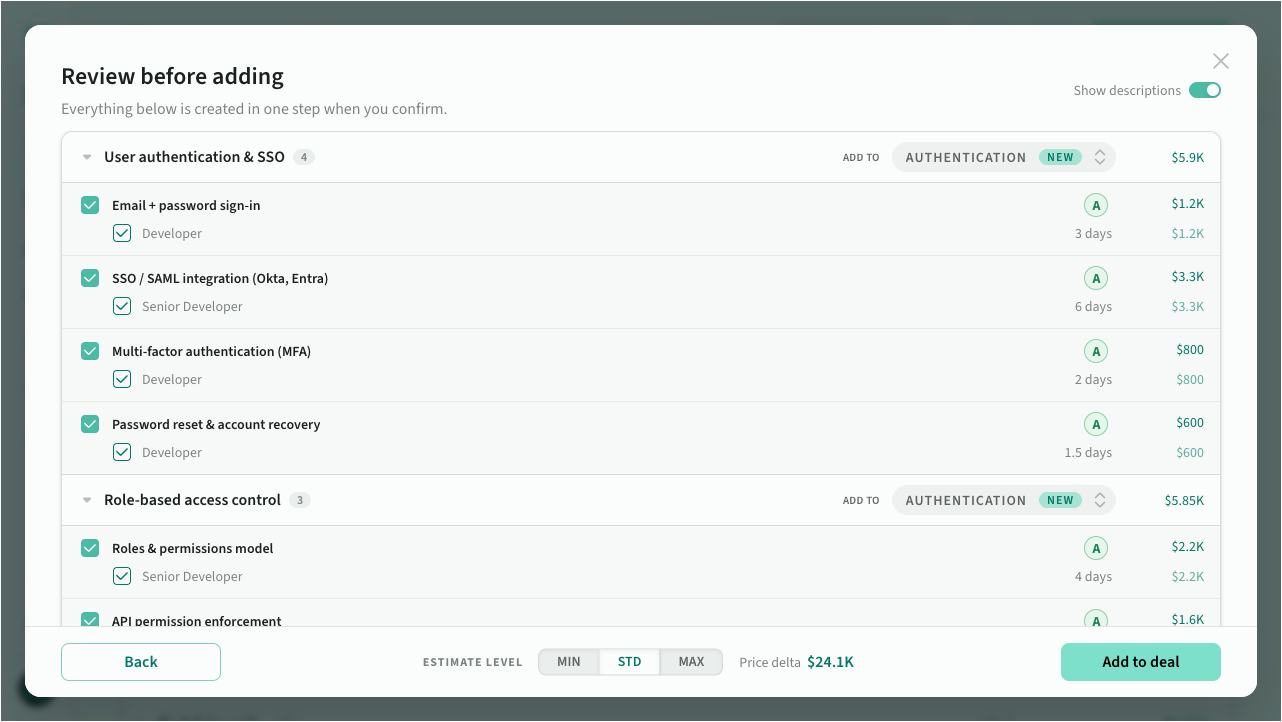 Review before adding
See how much of a deal is standard
A feature or task that came from the library, whether filled or promoted, remembers where it came from. Its estimate row shows a Library mark, which reads Modified once its estimates move materially from the typical range, roughly 30% under or 50% over. Hover the mark for a donut of how far it has moved, by price and by scope. Work written from scratch carries no mark.
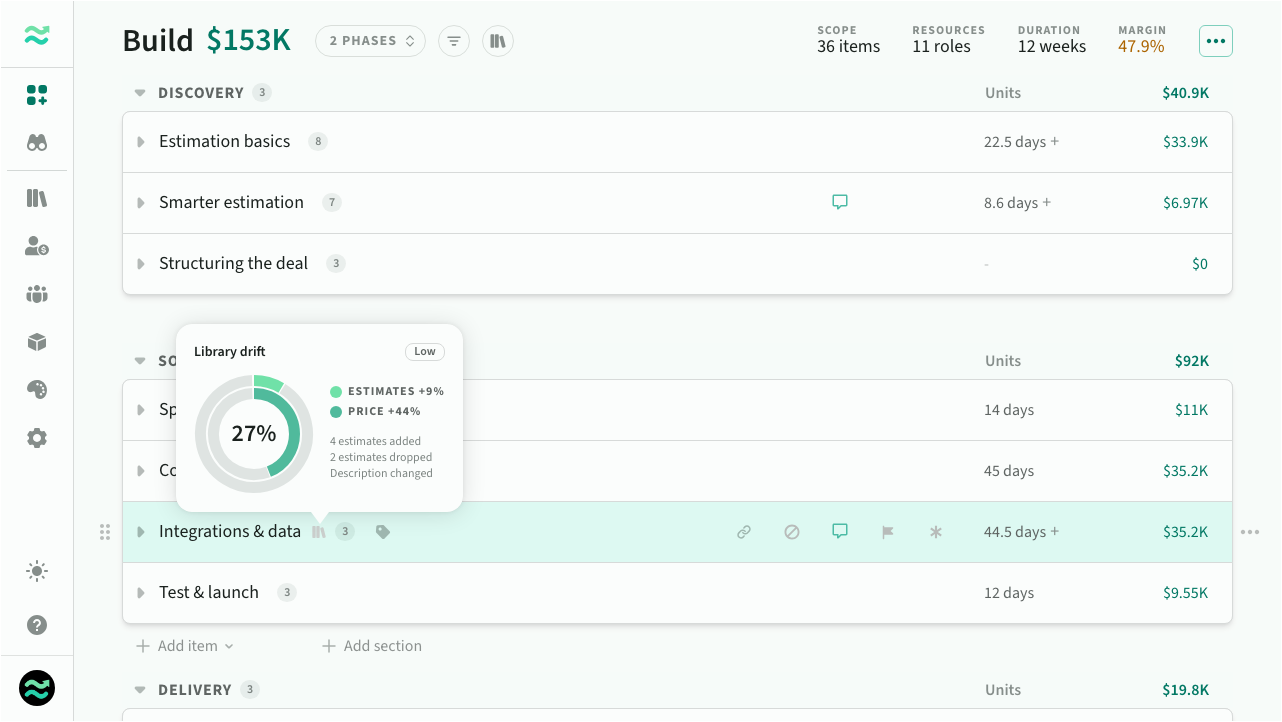 Library drift on a reused feature
Filter the estimate by Library to show only standard, modified, or custom work, and the scope page adds a standardization breakdown by price and by count.
Requesting approval and approving both show a Commercial assessment beside the summary: gross margin against the deal's accepted range, library coverage, and library drift. The deal also carries a reuse grade, A+ through C, F when an established library went unused, and n/a when there's no library yet.
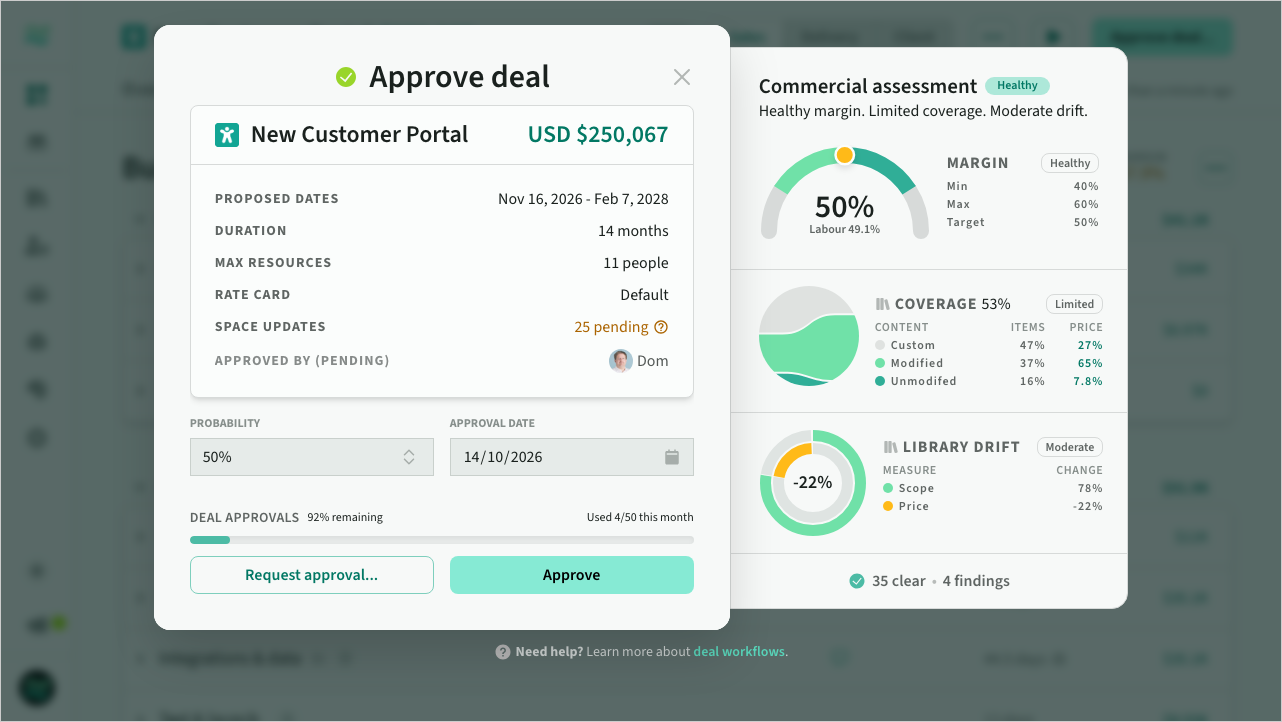 Commercial assessment on approval