



Most statements of work are written twice. Once as a priced estimate in a spreadsheet, and again as a Word document the week the deal is closing. Every time someone re-keys scope into a new file, something drifts. A deliverable loses an assumption. A role swaps from "senior" to "lead" and the margin moves. An exclusion gets dropped because nobody wanted to explain it on page six.
Done well, the SOW is the estimate, written up. Done poorly, it is a separate document that contradicts the estimate and the invoices that follow.
This guide is the "how to generate one" half, aimed at presales leads, heads of delivery, and founders at technology solution providers, systems integrators, and MSPs. For the reference side (what a SOW is, what goes in one, how it compares to a proposal or MSA), see statement of work, what belongs in one.
Estimate-first, not template-first
SOW generation is the act of producing a statement of work from a structured priced estimate, not from a blank template. The priced estimate is the source. The SOW is an output.
That framing changes what the tool has to do. Instead of "give me a Word template with placeholders," the job is "take the deal I already built, in the shape I built it, and render it as a contract-grade document that matches the commercial model."
When the estimate and the SOW share a model:
- Deliverables in the SOW are the deliverables in the priced scope. Not a narrative summary.
- Roles and rates in the commercial section are the rates used to calculate the price. Not a separate table someone retyped.
- The schedule in the SOW is the schedule that drove effort into pricing. Not a PM's best guess.
- Assumptions and exclusions in the SOW are the assumptions that protect margin in the estimate.
- The change mechanism references the structured scope, so a change request can be priced against the original without rebuilding the model.
A workflow that stops the drift
A repeatable workflow for teams moving off a Word-first process. It assumes you already have a structured estimate with deliverables, roles, rates, and a schedule.
1. Make the estimate the source of truth
Decide, as a team, that the priced estimate is the single source of truth for scope, price, and schedule. If a seller wants to change the price, they change it in the estimate, not in the SOW. If delivery wants to change the schedule, same rule. The SOW is rendered from the estimate, always.
This is a process decision before it is a tooling one. Teams that skip it end up with a nicer template and the same drift.
2. Codify assumptions and exclusions at estimate time
Write assumptions and exclusions when you price, not when you paper the deal. Presales captures them in the estimate as structured items, not prose, so they flow straight into the SOW without anyone rewriting them. For why this matters at the handover, see sales to delivery handover.
3. Anchor the rate card and rounding rules
Pick one rate card per region or customer, one rounding rule, one margin floor. Apply them at the estimate level. When the SOW renders, the commercial section is the same logic that priced the work, in the same currency, to the same precision.
4. Structure the scope the way delivery thinks
Group scope into phases, workstreams, or features that survive the handover. If the estimate uses one structure and the SOW uses another, you have rebuilt the model.
5. Tie milestones to deliverables, not dates
Milestones that reference deliverables are precise. Milestones that reference dates slip the moment discovery runs long. Anchor payment triggers to deliverables wherever possible.
6. Render, then review
Generate the SOW from the estimate, read it end to end, and mark the one or two sections that still need human judgement: the executive summary, the customer context, and any bespoke contractual terms. Everything else should render clean.
7. Version the SOW as a version of the deal
When the SOW is signed, pin the deal. If a change request comes in, open a new version of the deal, re-price, render the change, and have the customer sign it. The SOW and the estimate stay linked through their versions, not through an email chain.
The change request problem
On any fixed-price SOW longer than a few weeks, change requests are where margin goes to die. A small change lands, the delivery team absorbs it because it is "just a bit of work," and by month three there are fifteen small changes no one priced.
The fix is process, tooling, and a contract clause working together.
Process. Any scope change goes through the same path: raised, sized, priced, approved. No exceptions. If the PM can absorb it, it is not a change.
Tooling. A change request is not a new SOW; it is a new version of the priced estimate. Delivery should be able to open the estimate, add the change, re-price, and render the change request from the same model.
Contract clause. The SOW defines what constitutes a change, how it is priced, and who approves it. "Mutually agreed" is not a mechanism. "Any scope change greater than 5% of contract value requires written approval from the sponsor within five business days, priced at the rates in Schedule A" is.
For more on stopping change requests from eroding margin, see never discount without a trade.
Templates are not the answer on their own
Every firm has a SOW template. Most firms have three. A template tells you the shape of the document. It does not tell you where the content comes from or how it stays in sync with the priced estimate.
A useful template has two properties. The minimum number of sections needed to cover the contract, no more. And it is built so the content-bearing sections (scope, schedule, commercials, assumptions) can be generated from the estimate, not retyped. A template that requires a presales lead to paste cells from a spreadsheet into a Word table every deal is not saving time. It is introducing errors at a predictable rate.
Spreadsheet and Word, or an estimation platform
For a firm doing a handful of SOWs a quarter, the spreadsheet-plus-Word workflow is survivable. It is slow and it leaks, but it works. For a firm doing dozens a quarter across multiple practices, the reconciliation tax grows linearly with deal volume and the handover to delivery becomes a negotiation instead of a transfer.
The category relevant at that point is commercial estimation software. A useful shortlist asks three questions.
- Can the tool generate a SOW from the same structured model that priced the work, without copy-paste?
- Can it version the deal so change requests are priced against the original model?
- Can it push the final scope and schedule into the delivery tools your teams already use?
If a platform cannot do all three, it is a proposal-generation tool, not an estimation platform.
Where Estii fits
Estii is built around the idea that the priced estimate, the scope, the schedule, and the proposal have to stay linked from first quote to signed SOW. That turns most SOW generation problems into product mechanics.
The SOW is a proposal appendix, rendered from the deal
Estii's generated proposals include a structured Scope of Work appendix that itemises every line item by phase, category, and section. Slide settings control whether each line shows role estimates, units, and prices, so the same deal can ship a customer-facing SOW with headline numbers and a delivery-facing SOW with the full breakdown. No retyping, no copy-paste.
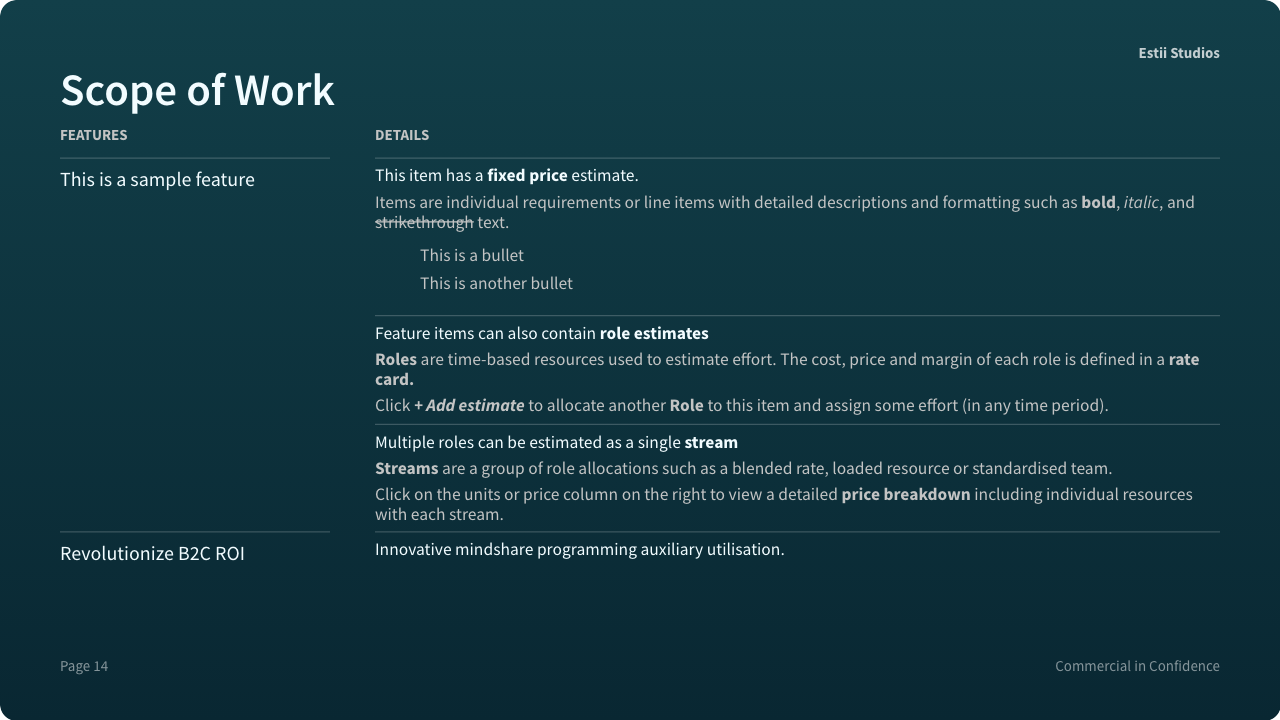 Itemised SOW appendix with estimates, units, and prices
Scope changes in one click, SOW regenerates
Scope in Estii is an interactive pivot over the deal's estimates. Click any priority, item, or workstream to descope it. The effort, value, price, and schedule recalculate across every breakdown in the same interaction. Regenerate the proposal and the SOW appendix reflects the new scope, at the new price, on the new schedule. A CFO asks to drop a workstream on Thursday; the revised proposal and SOW are out by Thursday afternoon.
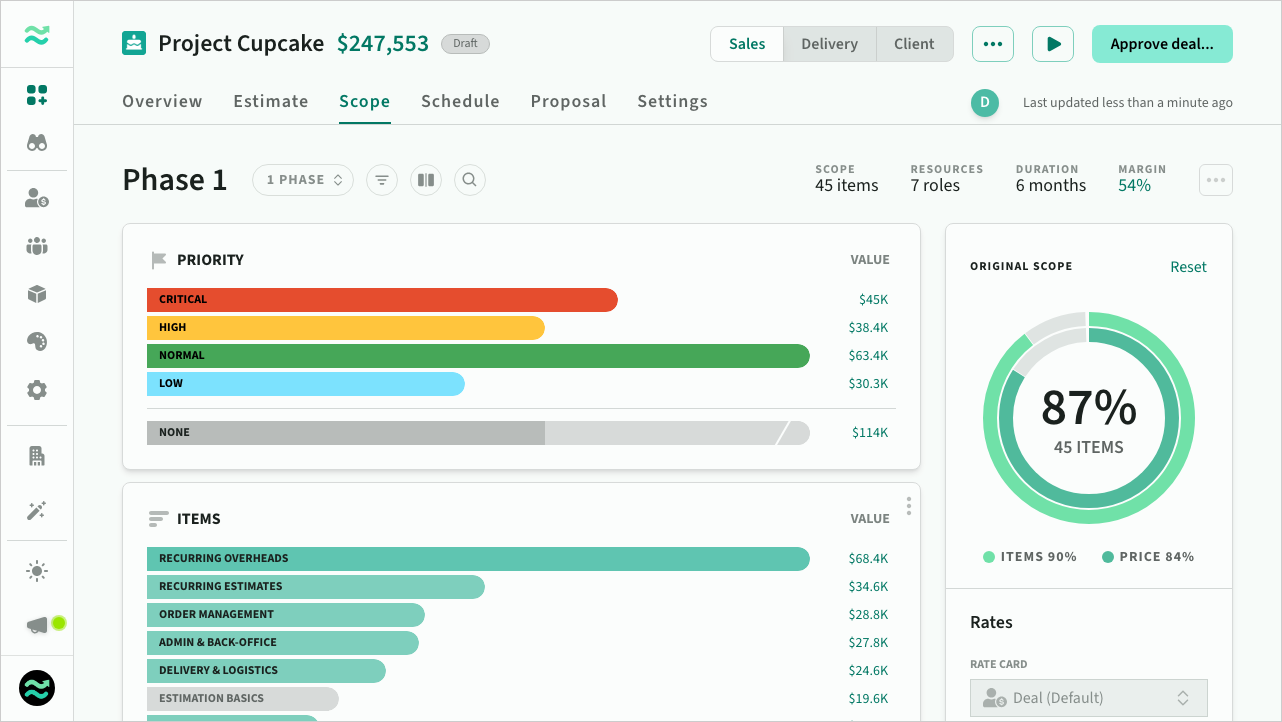 Descoped items shown in grey, price recalculates instantly
Rescope cascades to schedule and milestones
Descoping does not just change the price. The schedule auto-recalculates a best-fit duration and resource plan from the new scope, and payment milestones adjust dynamically to the new price and duration. The SOW appendix, milestone waterfall, and resource plan stay in sync without manual editing.
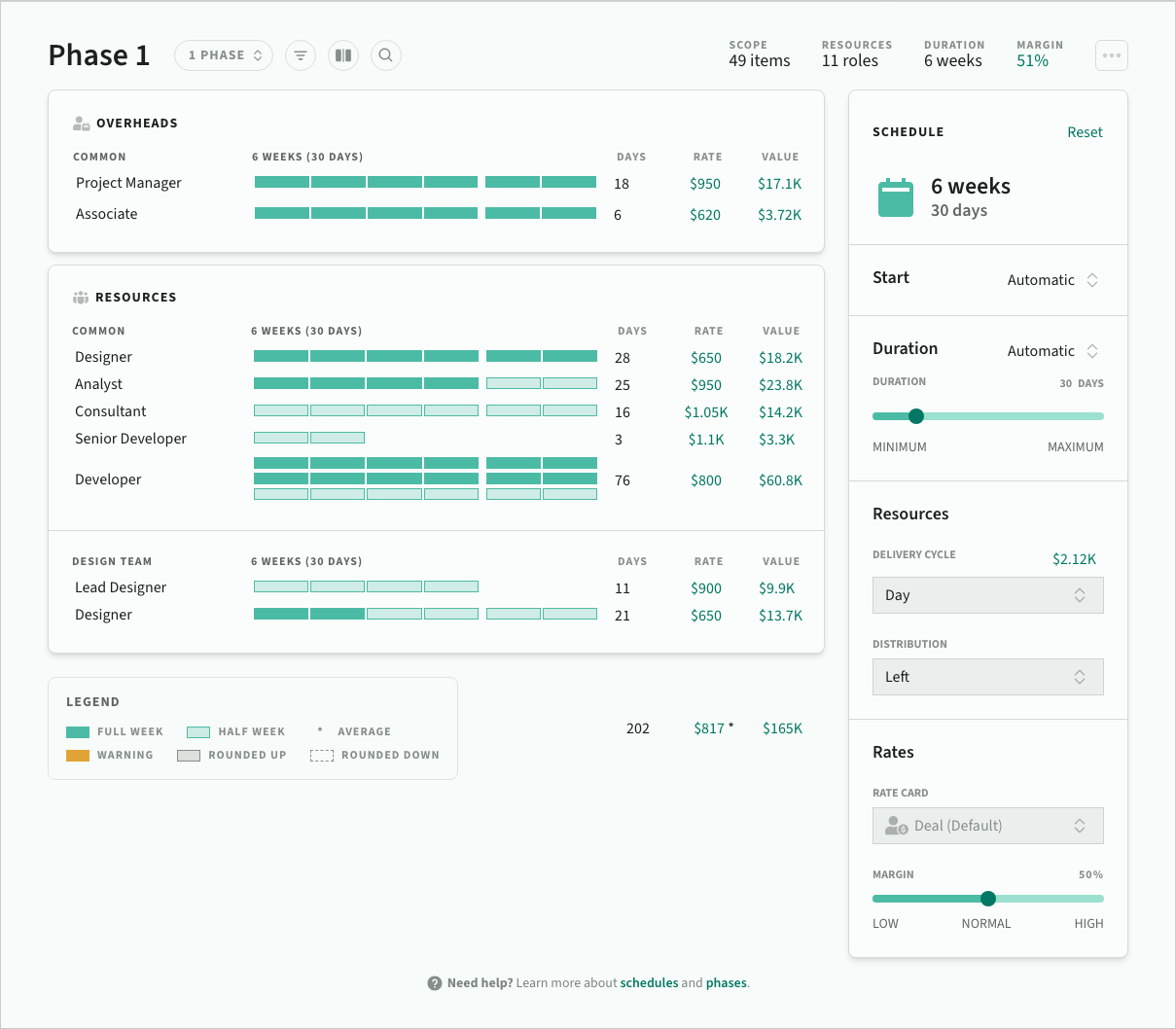 Best-fit schedule updates automatically when scope changes
Every approved SOW is a pinned version
Estii creates deal versions automatically on redraft and approval. Approved deals go read-only, so the signed state is locked. A change request opens a new draft without touching the prior version, and each version has a unique URL for preview or comparison. When a customer asks what was signed in March, the March version is one click away.
 Deal with multiple saved versions and a locked signed state
What this looks like in practice
A seller and a presales lead are on a call with a CFO who wants 15% off a six-figure SOW. In ten minutes they descope three low-priority items, change the delivery cycle from fortnightly to monthly, and regenerate the proposal. The SOW appendix has the new scope. The milestones waterfall has the new payment schedule. The resource plan has the new duration. The prior version is pinned as "Draft 3, sent 14 Feb." Nothing was retyped. Nothing drifted.
You can try Estii for free at estii.com.
Wrapping up
SOW generation is the last mile of the commercial model, and the place where scope, price, and schedule either stay linked or quietly come apart. Firms that keep them linked treat the priced estimate as the source of truth, render the SOW from it, and version the model when things change.
FAQ
Is SOW generation the same as proposal generation?
No. Proposal generation is a presentation-layer task: branding, narrative, visual polish. SOW generation is a commercial task: rendering scope, schedule, and pricing from a structured estimate into a contract-grade document. The two often share a source model but solve different problems.
How do I handle change requests against a signed SOW?
Raise, size, price, approve, and append. Treat each change as a new version of the priced estimate, re-render the change request from the same model, and have the customer sign the change. The signed SOW plus signed change requests is the contract state.
When should I move off Word SOWs?
When the reconciliation tax starts costing more than the tool would. For most firms, that is somewhere between twenty and fifty SOWs a year, or the first time a missed assumption costs more than a month of platform fees.