 Getting started
 Pipeline
 Forecasts
 Deals
Deals Deals (advanced)
 Proposals
 Exports
 Library
 Resources
 Integrations
 Settings
 Glossary
 FAQs
FAQs Releases
Opportunities
IN THIS ARTICLE
An opportunity groups the deals you have priced for the same piece of work. Each deal in it is a variant: a phased option, a fixed price and a time and materials version, or a revised round after the buyer pushed back.
Variants
Each variant is a full deal, with its own scope, price, schedule, status and versions. It is named twice: by its opportunity, and by a short variant name of its own, such as "Phase 1 only" or "Replatform".
Every variant of an opportunity shares one account. Changing the account on one variant changes it on all of them, unless a variant's status no longer allows it.
The primary variant
An opportunity counts as one of its variants, the primary. The primary is the variant furthest along, and between variants at the same status, the one listed first.
On the pipeline, the primary's price shows in green and every other variant's price in grey. Hover a price to see whether that variant is the primary, what would make it one, or that it no longer counts because it was abandoned. Pipeline totals, the forecasts page and win rate count an opportunity once, as its primary.
To make another variant primary, drag it above its siblings, or choose Make primary from its row in the variants panel.
On the pipeline
Where an opportunity has several variants in one status, they show together under the opportunity's name, its account, and a count of its variants. Where only one variant is in a status, it shows as a single card or row under the opportunity's name.
Click the variant count, or the variant name on a single row, to open the variants panel. It lists every variant with its price and status, and each row has a menu to open, duplicate, abandon or remove that variant.
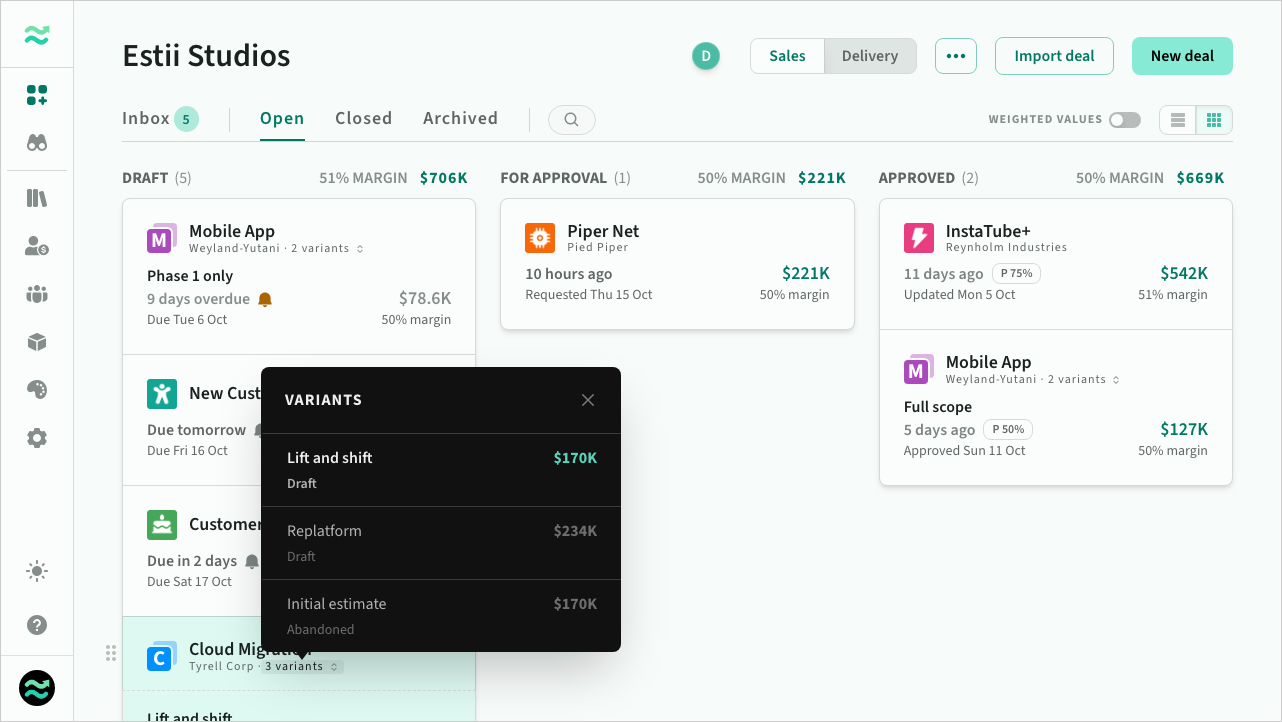 The variants panel for an opportunity
Drag a variant to reorder it among its siblings, or to move it to another status. Drag the opportunity's name to move all its variants in that status together. Move up and Move down in the menu do the same within a status.
Where several variants show together in a status, the menu on the opportunity's name acts on all of them at once: Request approvals..., Approve all..., Close all..., Archive all..., Unarchive all... or Delete all..., depending on the status. Dragging the opportunity's name to For approval or Approved opens the same approval dialog. It steps through each variant's summary and assessment, and you can untick any you want to leave where they are.
Archived variants of an opportunity also show together on the Archived tab.
Closing an opportunity
Winning or losing one variant settles the whole opportunity. When you close a variant as won or lost, its other open variants are abandoned with the reason Another variant won or Opportunity lost, and a win also abandons an earlier win. The close dialog lists them under Also abandoned before you confirm.
When you abandon a variant, choose whether to abandon this variant only or every variant of the opportunity.
Close all... on the opportunity's name closes the variants shown under it: pick the winning variant, pick the variant the lost opportunity counts as, or abandon just those variants. The variant you pick shows first in the opportunity.
On the Closed tab, an opportunity that was won or lost shows by its winning or losing variant. Open the variants panel from its name to see the variants abandoned with it.
Archive all... archives every variant of the opportunity, and Unarchive all... restores them. A variant still approved or in play has to be closed or redrafted first.
Redrafting a variant changes that variant alone. Variants abandoned when it closed stay abandoned.
Creating an opportunity
There are three ways to put deals in an opportunity:
- Duplicate a deal. Choose New variant to price an alternative beside the original, or Replacement to create a new version and abandon the original. The first time you do this, you name the opportunity and give both deals a variant name.
- Start a new deal inside one. In the new deal dialog, start typing the name of an existing opportunity and choose it. Add a variant name; the deal takes the opportunity's account.
- Add an existing deal. From the deal menu, choose Add to opportunity... and pick an opportunity, or another deal to group it with.
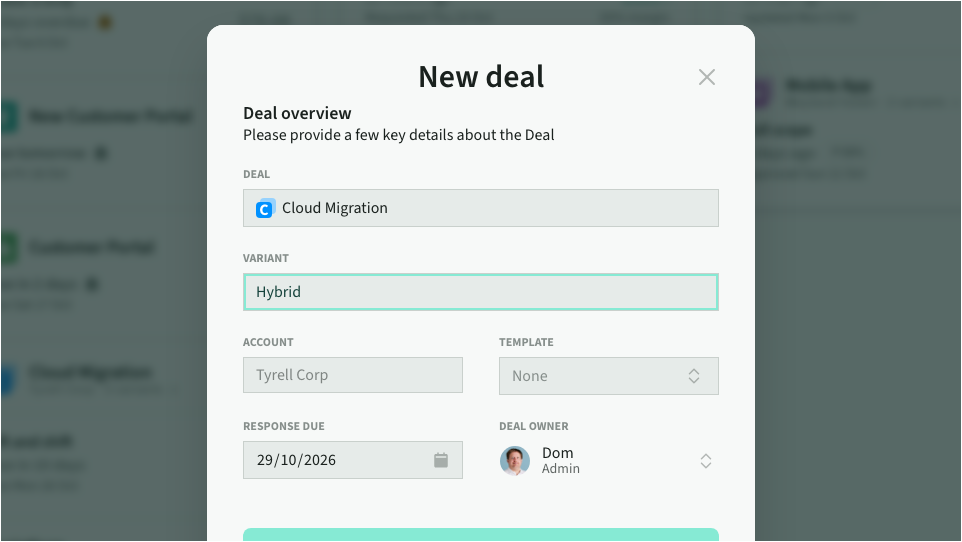 Starting a new deal inside an opportunity
Names
A variant's header shows the opportunity name as its title and the variant name on the line beneath, with the number of saved versions beside it. Click the variant name to open the variant switcher: every variant with its status and price, and this variant's versions beneath it. Choose a variant to open it, or a version to preview it.
You can rename the opportunity from any of its variants, whatever their status. Rename a variant from its row in the switcher. The variant name follows the same rules as a deal name, so it locks once the deal leaves draft.
 A variant's header
Removing a deal from an opportunity
From the deal menu or the variants panel, choose Remove from opportunity... and give the deal a name of its own. It then appears on the pipeline as an ordinary deal. When the last variant leaves, the opportunity is removed.